How to summarize Google Forms responses with AI
Updated November 10, 2026 · By Tinkerer (Pratik Poddar), who makes Formlume
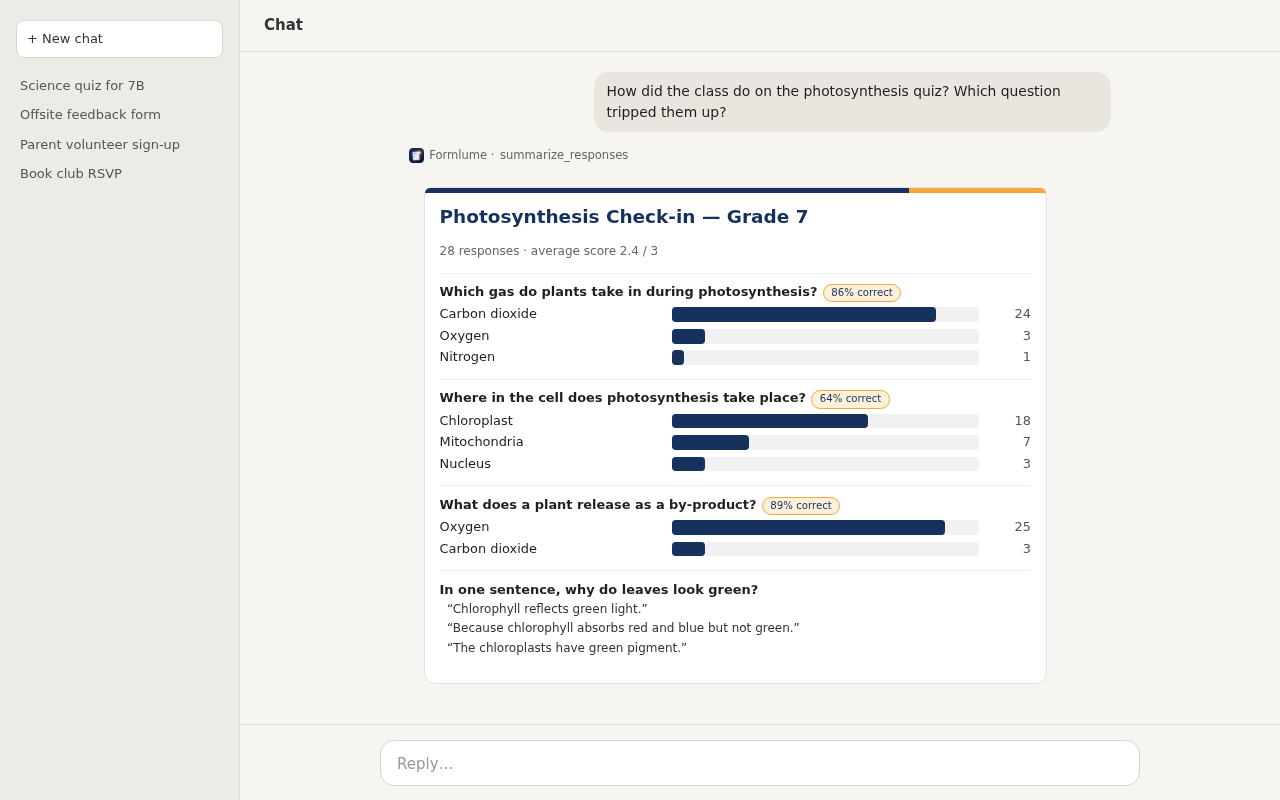
Short answer: If Formlume created the form, ask ChatGPT or Claude “summarize the responses to my [form name]”. You get per-question counts, scale averages, recent text answers and, for quizzes, scores, drawn as charts in the chat.
Connector URL
https://forms.pratikpoddar.in/mcpAdd it as a custom connector in Claude or ChatGPT, then sign in with Google. Step-by-step setup. Free for 3 new forms a month.
Questions you can ask
- “How many people are coming to the team dinner, and what dietary needs came up?”
- “What's the average rating for the venue question?”
- “Show me the responses since yesterday.”
Other routes
Gemini in Google Forms can summarize responses on eligible plans. Or link the form to Google Sheets (Responses → Link to Sheets) and paste the sheet into any AI chat. Check what you share, since responses may contain personal data.
FAQ
- Does Formlume store my responses?
- No. It reads responses from Google when you ask and summarizes them in memory. Response data isn't stored.
- Which forms can it summarize?
- Forms that Formlume created. Its drive.file permission doesn't let it open other forms in your Drive.
- Is there a built-in option?
- Gemini in Google Forms can summarize and analyze responses on eligible Workspace or Google AI plans. Without it, you can link the form to Sheets and paste the data into an AI chat.